

I just want to read a markdown file, from the terminal, without breaking my flow. That’s a smaller ask than it sounds — most tools built for markdown are either full editors or trying to do too much.
The Contenders
Glow is awesome and super popular for a reason, but it just wasn’t my vibe. It bugged me that it wouldn’t show files in my current dir, and when / didn’t work for search, I just bailed. Turns out I just needed to read the docs or tweak the config. That is on me, but I’d already moved on by then!
I used MarkText for a while. It gets the job done, but as a full GUI app, it forces you to alt-tab out of the terminal just to check a README. That said, it absolutely deserves credit. It’s a well-designed application that works seamlessly, which explains its impressive 61K stars and 4.5K forks on GitHub.
Nvim‘s situation is more nuanced. It handles markdown fine out of the box. The issue isn’t capability, it’s that I’m keeping my config lean, and getting markdown to render nicely with proper tables, cleaner formatting means reaching for another plugin. Plugin-after-plugin feels counterproductive. It’s not that nvim can’t do it. It’s that I don’t want nvim to be the thing that does it. For simple ones, sure but when you have heavy formatting and tables, then no.
I’ve tried KDE’s Ghostwriter, too. It’s fast and solid, but built for serious authoring. It still forces you out of the terminal. Fun fact: I actually wrote this post in it. I like it, but again, it’s just not a terminal tool.
What I Actually Wanted
- Terminal-native, no context switch
- Shows me the markdown files in my pwd if I don’t specify one
- Search that actually searches the open buffer
- Tables that render properly, because so much technical markdown lives and dies by its tables
Enter Leaf
curl -fsSL https://leaf.rivolink.mg/install.sh | shleaf file.md opens the file directly. Run leaf on its own and it lists the markdown files in your current directory. It’s written in Rust, so speed was never really a question.
Hit / and it searches the open buffer immediately, matches highlighted, navigable with n/N — the way you’d assume any text viewer should work from the start. Tables render cleanly with proper borders and alignment. There’s a table-of-contents sidebar (t) with heading hierarchy, which is genuinely useful for longer docs.
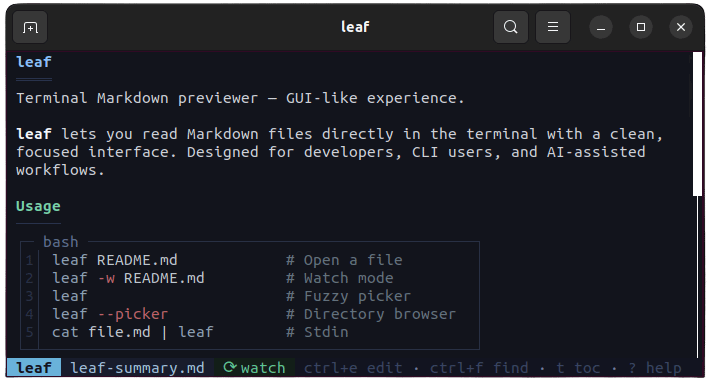
The editor integration, and its one asterisk: Ctrl+E opens the current file in an editor. Its default is nano, not your $EDITOR. But it lets you override this in config.toml:
editor = 'nvim +{$line}'That opens nvim at the exact line you were viewing in leaf, and reloads the preview when you return. If you’d rather not touch the config file at all, there’s also a per-run flag:
leaf --editor nvim file.md<br><br>Nicely done — except it doesn’t fall back to your $EDITOR environment variable automatically, even if you’ve got one set. You have to explicitly configure it in leaf’s own config or pass it via flag, which feels like a step that shouldn’t be necessary given how many tools respect $EDITOR by default. Minor, but worth knowing before you go looking for why your shell’s editor of choice isn’t showing up.
Update: Shortly after this post went up, RivoLink (leaf's developer) shipped$EDITORsupport directly in response.Ctrl+Enow respects your environment variable out of the box, no config or flag required. Good to see a gap get closed that fast, and even better to see a maintainer that responsive to feedback.
The Verdict
For the specific job of “quickly viewing a markdown file without leaving the terminal,” Leaf is the first tool that felt right. There’s no GUI tax, no plugin sprawl, and the search works exactly where you’d expect it to, making it a genuinely frictionless addition to a terminal workflow.
Worth flagging: Leaf is young. It’s only a few months old, actively patched, and still growing its user base. This isn’t a “trust it blindly” review; it’s an early impression from someone who just switched. So far, though, it’s the first tool in this search that hasn’t made me compromise.



Hi, author here!
Thank you so much for this article!
I can really relate to your experience, it’s actually very close to what led me to create leaf in the first place. I also wanted a simple Markdown viewer that would stay in the terminal without forcing me into a full editor or GUI.
I hope leaf continues to be useful in your workflow and projects. Thanks again for taking the time to write about it!
PS: You’re right about `$EDITOR`. I’ll add automatic `$EDITOR` support in the next version. 😊
Hi. Great work with leaf. It’s a great tool. Thanks for considering to add $EDITOR support in the next version.